Time tracking
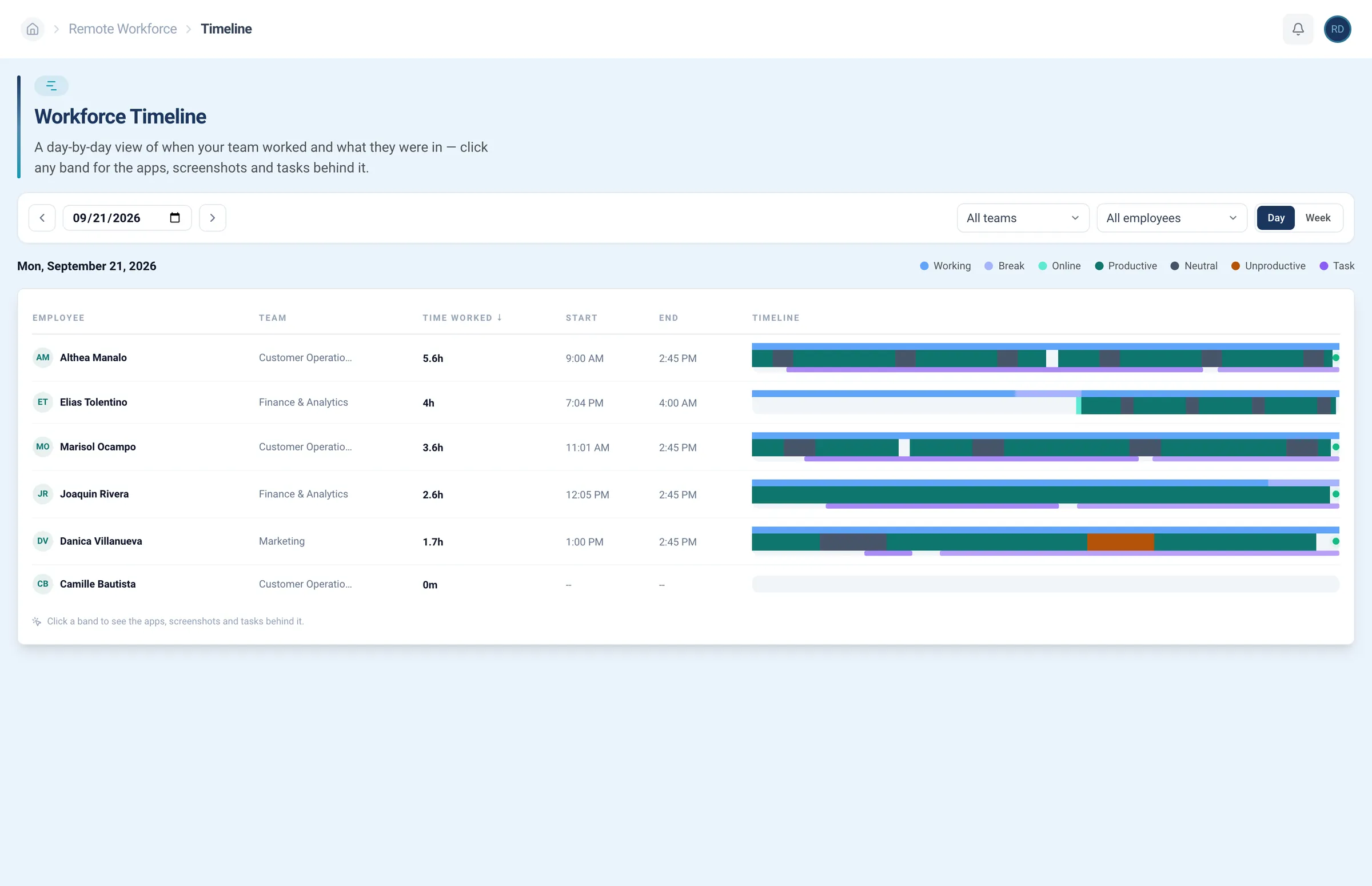
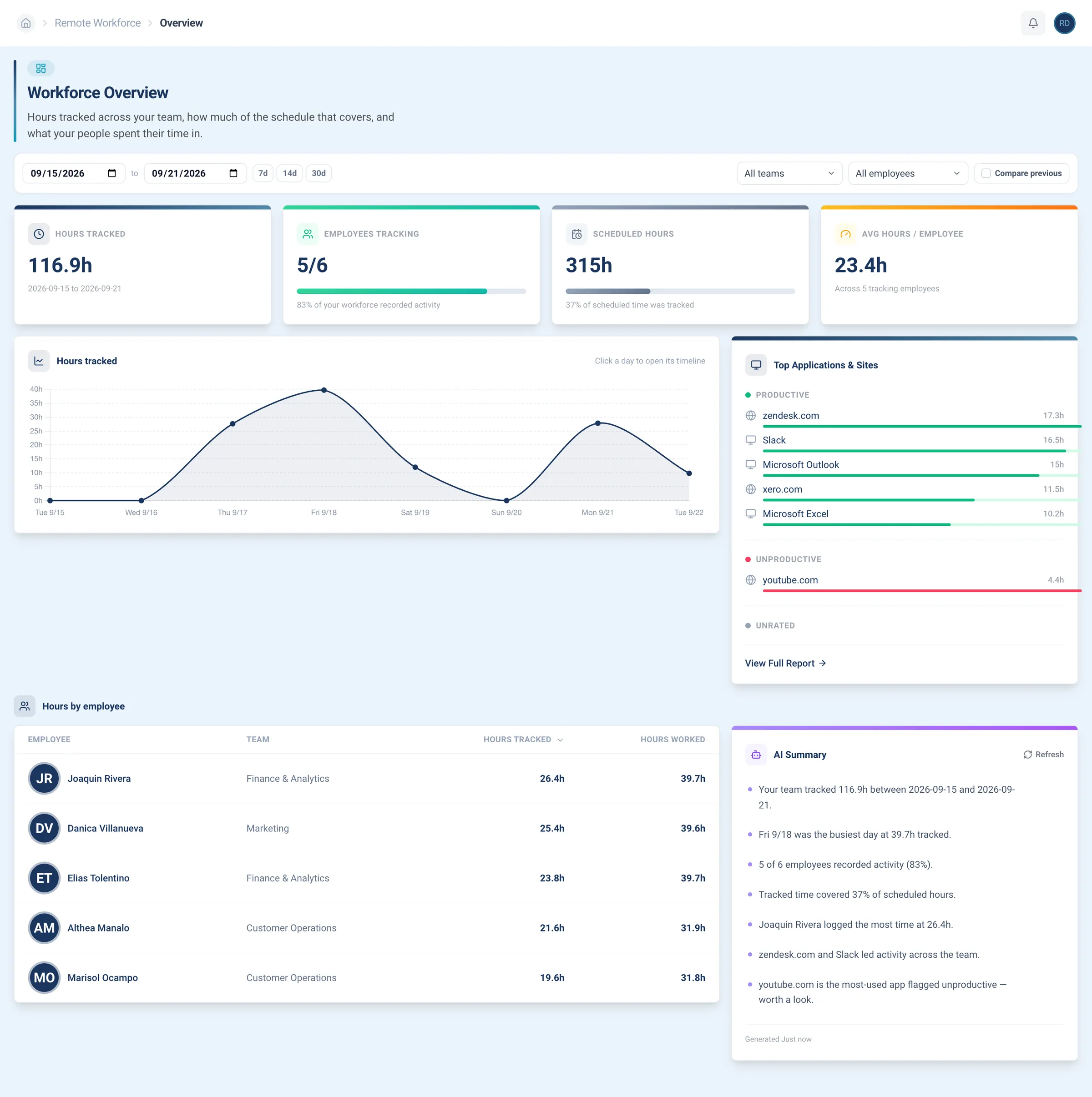
Hours tracked per day, laid out on a timeline you can read at a glance.
RE Portal · Tracking
Clock-ins, clock-outs, and hours worked for everyone on your remote team, next to the schedule you set. No spreadsheets, no guessing.
As featured in


















Remote employee time tracking that shows when each person worked, the apps and tasks they were in, and how your team’s week added up.
Time tracking
Each person’s day shows as blocks of work and breaks, so late starts, long breaks, and early finishes stand out at a glance.
Hours tracked per day, laid out on a timeline you can read at a glance.
Activity monitoring
Click any block of time and see what filled it: the tasks, the apps, and the sites. You decide what counts as productive.
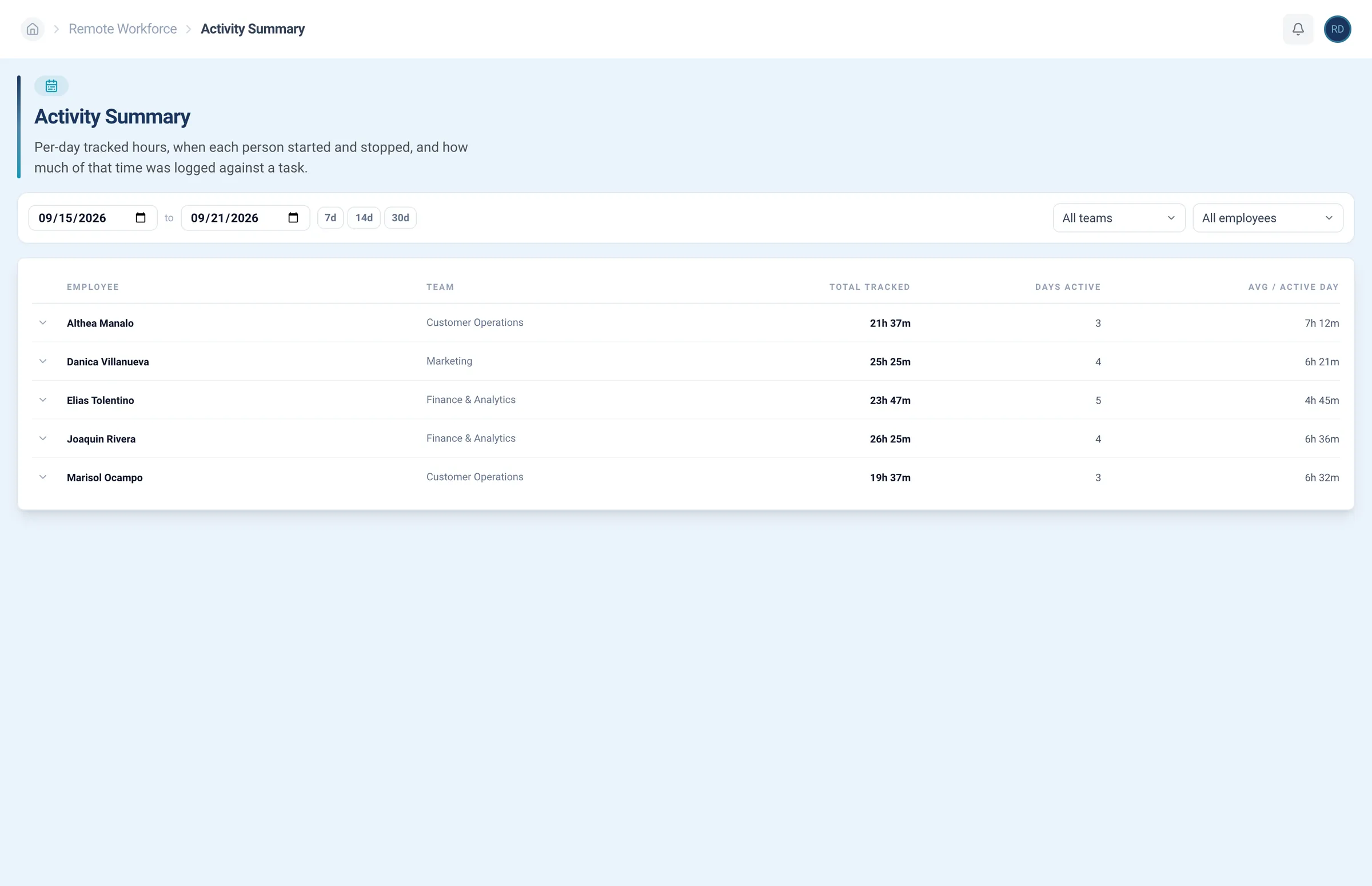
See when each person started and stopped, and how much was logged against a task.
Performance reports
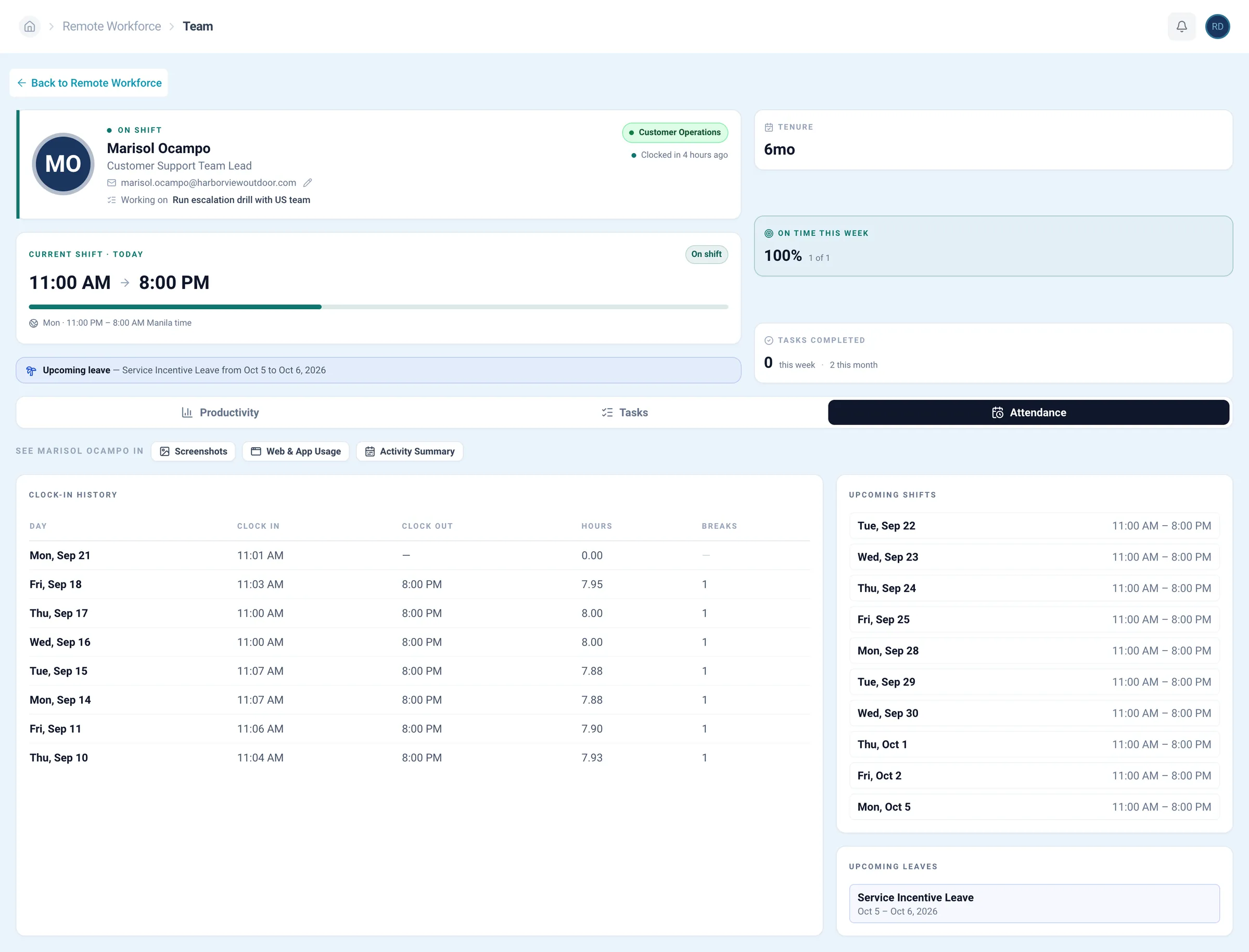
Hours tracked, how much of the schedule they covered, and where the time went, across every team.
Hours tracked across the team, how much of the schedule that covers, and the apps the time went into.
The actual RE Portal, screen by screen, as you’d use it each day. Underlined words move the lens, and any screen opens full size.
Want the full picture? Explore the RE Portal, book a walkthrough, or connect Claude or ChatGPT to ask for anyone’s hours in a chat.
Connect ChatGPT or Claude to the RE Portal through our MCP server. Ask about hours, shifts, and leave without opening a single report.
Works from Claude ChatGPT and any MCP-capable assistant
Set up the MCP serverTrusted by




















































Chat status shows who’s online. Timesheets rely on memory. The RE Portal logs the hours plus the apps, programs, and websites behind each one.
Hours, attendance, and activity in one place.
Online or away, nothing more.
Hours your team writes down.
Hours and activity, nothing else.
Competitor costs are typical published per-user ranges as of October 2026. Tracking comes with the RE Portal at no extra cost; hiring has a setup fee and a monthly fee.
Time tracking
Track the people you hired through us in the RE Portal, with an account manager who knows your team, their hours, and your goals.
Recruiting+Employment+HR+Payroll+IT=Remote Employee
Tracking is one part of it. The same login finds your next hire, assigns the work, and keeps it secure.
What clients say about tracking and managing their teams with us.
Open the portal, book a demo, or ask a recruiter how tracking works once your hire starts.
Enter your work email and open the tracking screens yourself. No sales call to get in.
Access the RE Portal freeWalk through clocking in, activity, and reports with someone who can answer questions as you go.
Book a demoHiring first? A recruiter can cover the role, the cost, and when your hire could start.
Talk to a recruiterWhat it shows, what it costs, and how it fits with the rest of the RE Portal.
It runs inside the RE Portal. Your hires’ hours are tracked per day and laid out on a timeline next to the hours you scheduled. Attendance, leave, and activity sit in the same place, so you can check a day or a whole week without messaging anyone.
It’s part of the RE Portal from Remote Employee®, the same login you use to hire and assign work.
The people you hire through Remote Employee®.
You can also add managers from your side and decide which positions each one can view and manage.
Yes, for your team. Tracking comes with the RE Portal at no extra cost.
What you pay for is the hire: a one-time setup fee per employee, then one monthly fee. No placement fee.
Yes. Every timeline sits next to the hours you scheduled.
Team reports also show how much of the schedule the tracked time covers, across every team and any date range.
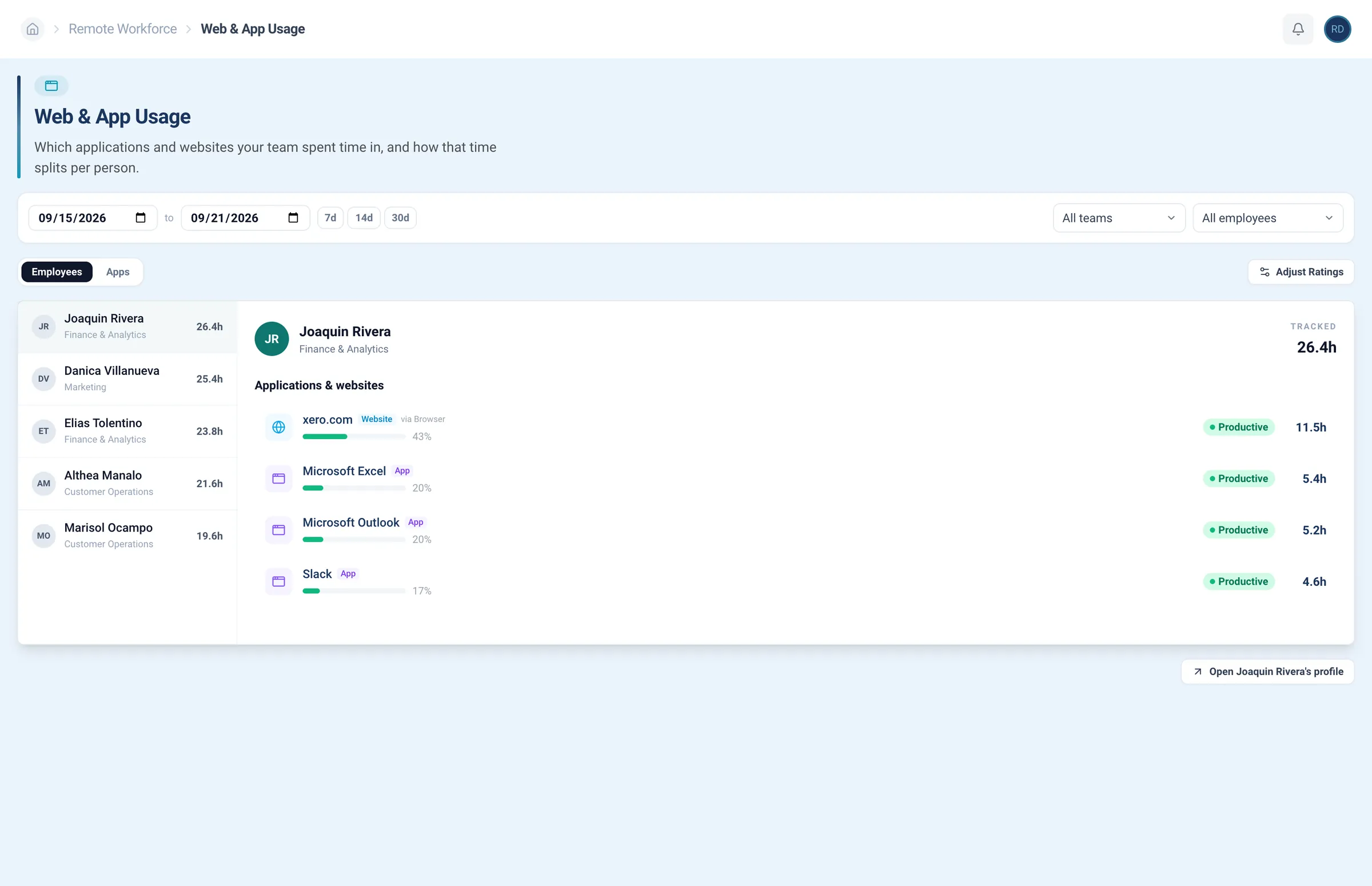
Yes. Web and app usage shows where the hours went, per person.
You rate each app as productive, neutral, or unproductive, so the reports follow your standards, not ours.
It does. Clock-in history, today’s shift in progress, upcoming shifts, and leave are all on the attendance screen.
Yes. Each block of time can show screenshots alongside the apps and tasks behind it.
Yes. Every shift, clock-in, and report shows in your time zone, so the hours line up with your own workday.
Yes. Connect either one to the RE Portal through our MCP server and ask about hours, shifts, and leave in plain language.
Disconnect anytime.
No. Recruiting, tracking, tasks, and access all live in one RE Portal login, so a new hire’s hours show up in the portal you hired them from.
Enter your work email to open the RE Portal. It’s free.
Prefer a guided look? Book a demo, and we’ll walk you through tracking first.