

















RE Portal · Productivity

Team productivity tools

Work lost in messages? Put them on one board.

Every project and task across your remote employees, who owns them, and the time spent on each. No more “any update?” threads.

Projects and the task board are free in the RE Portal once you hire through us.

Book a demo Walk through the task board with our team.

As featured in

Who’s doing what, and when.

Plan projects, hand out tasks, and check who’s working on what across your remote team, from the project down to the person.

Project management

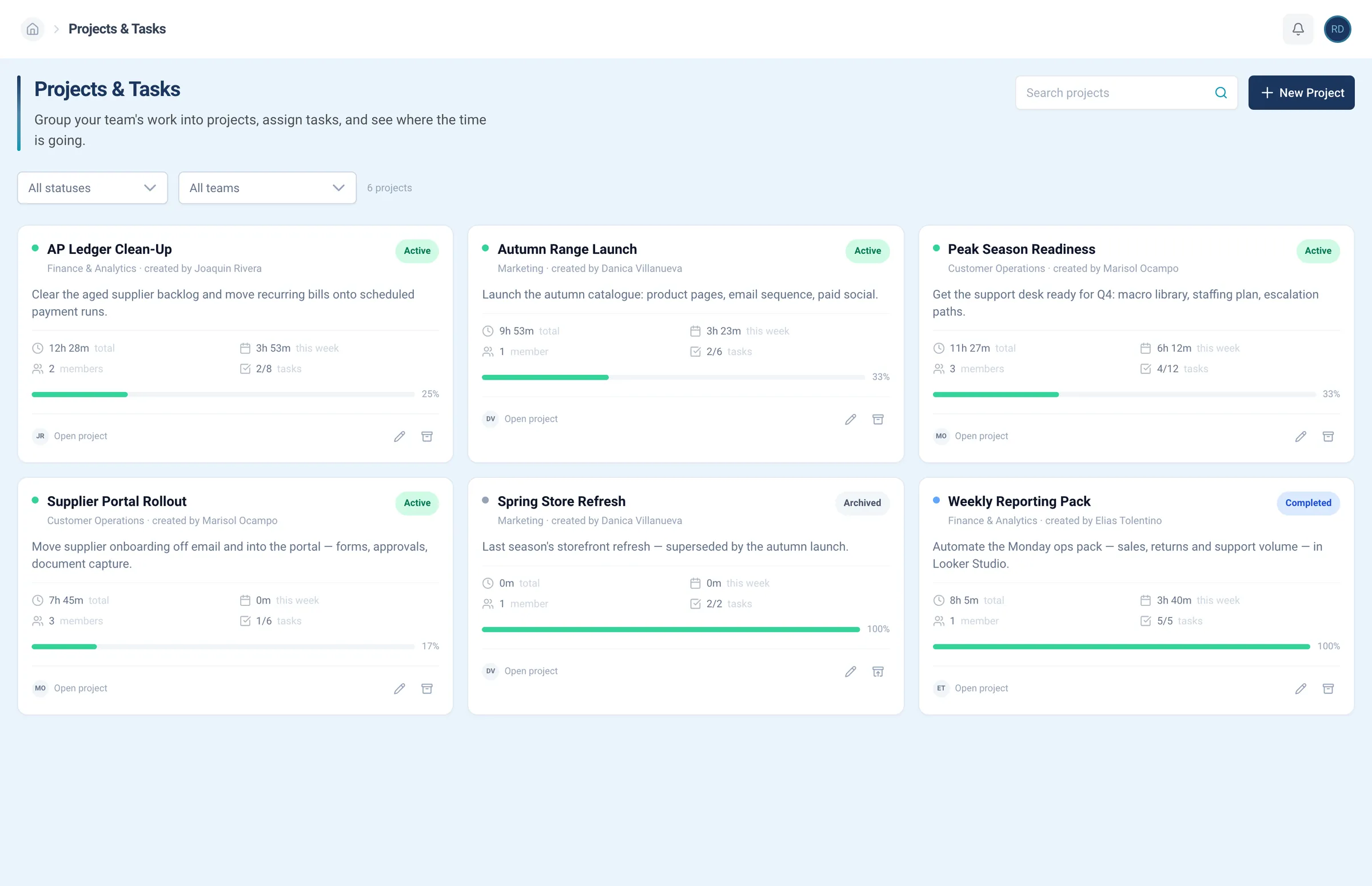
Every project, with everything in it.

Open a project and know who’s on it, what’s left, and how much time it’s taken so far. Nothing lives in someone’s inbox.

  • Members and tasks under each project
  • Time spent this week and in total
  • Status from active to completed, or archived
  • Filter by status and team

Project management

Group the work into projects, with members, tasks, and the time spent on each.

Task coordination

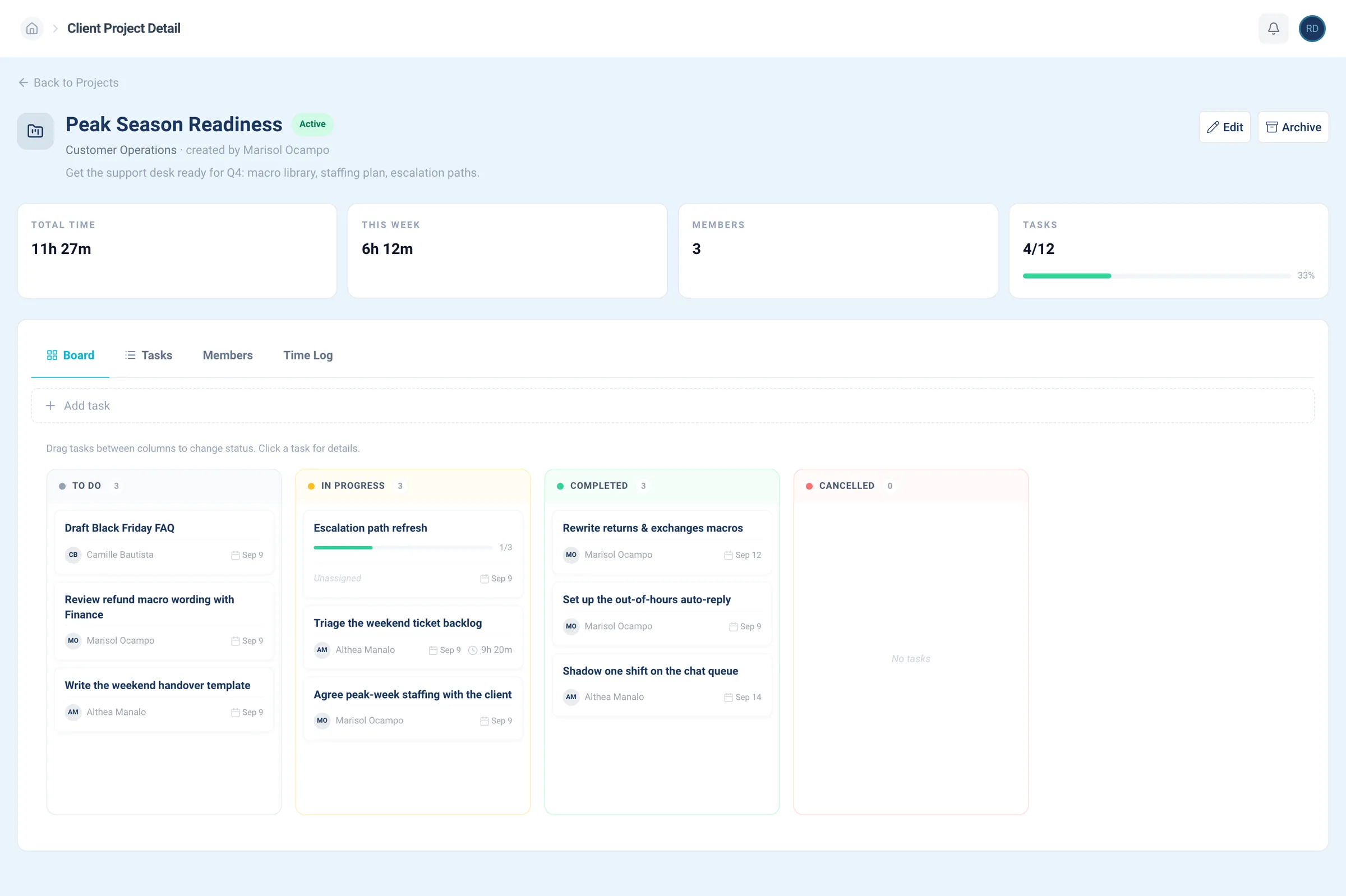
Hand it off once. Watch it move.

Give each task an owner, and the board shows what’s waiting, what’s moving, and what’s finished.

  • Tasks and subtasks for the right people
  • A board, from to-do to done
  • The time each task took
  • What each person is on right now

Task coordination

Assign tasks, move them across the board, and see what’s in progress.

Team organization

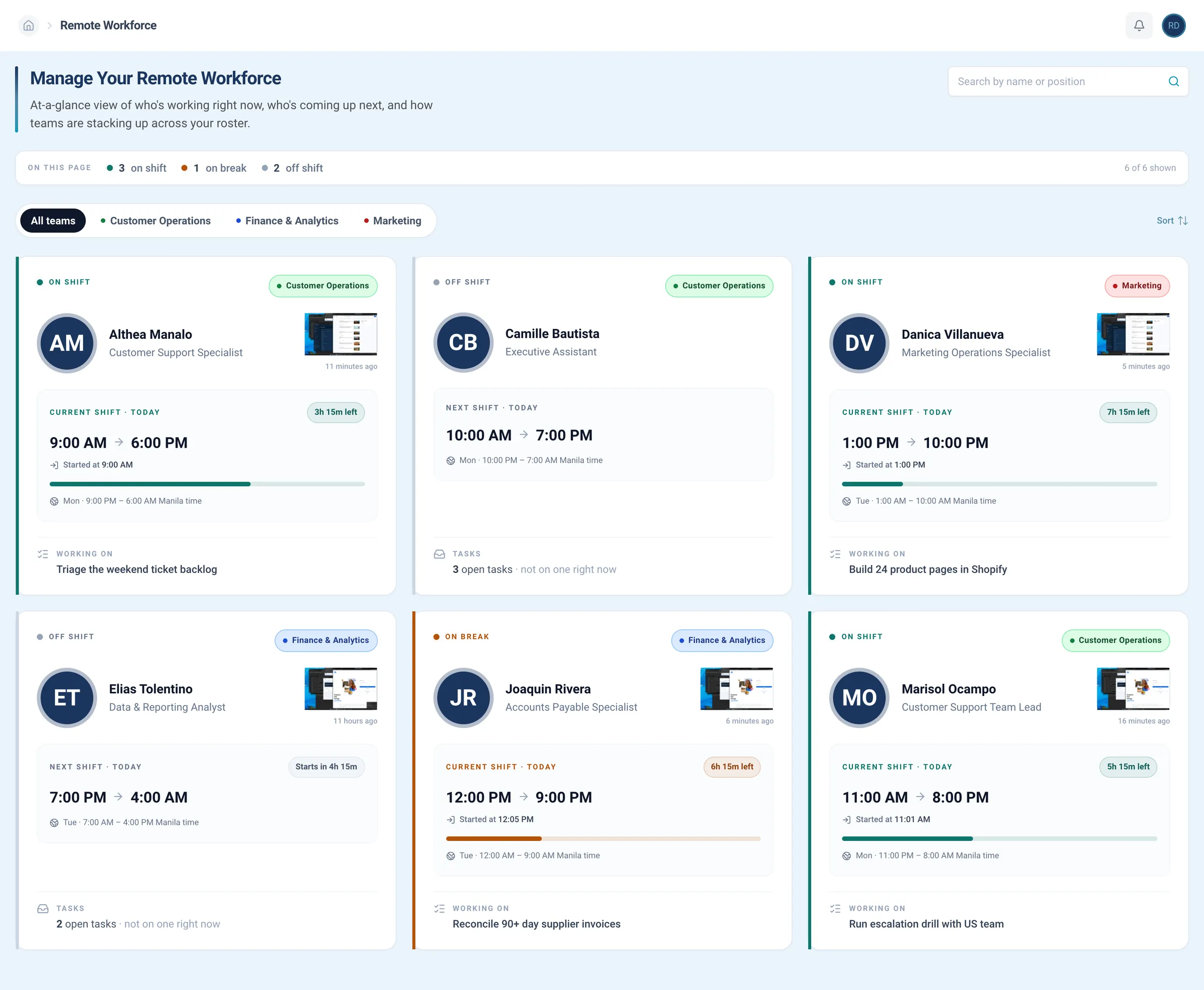
Your whole team, one page each.

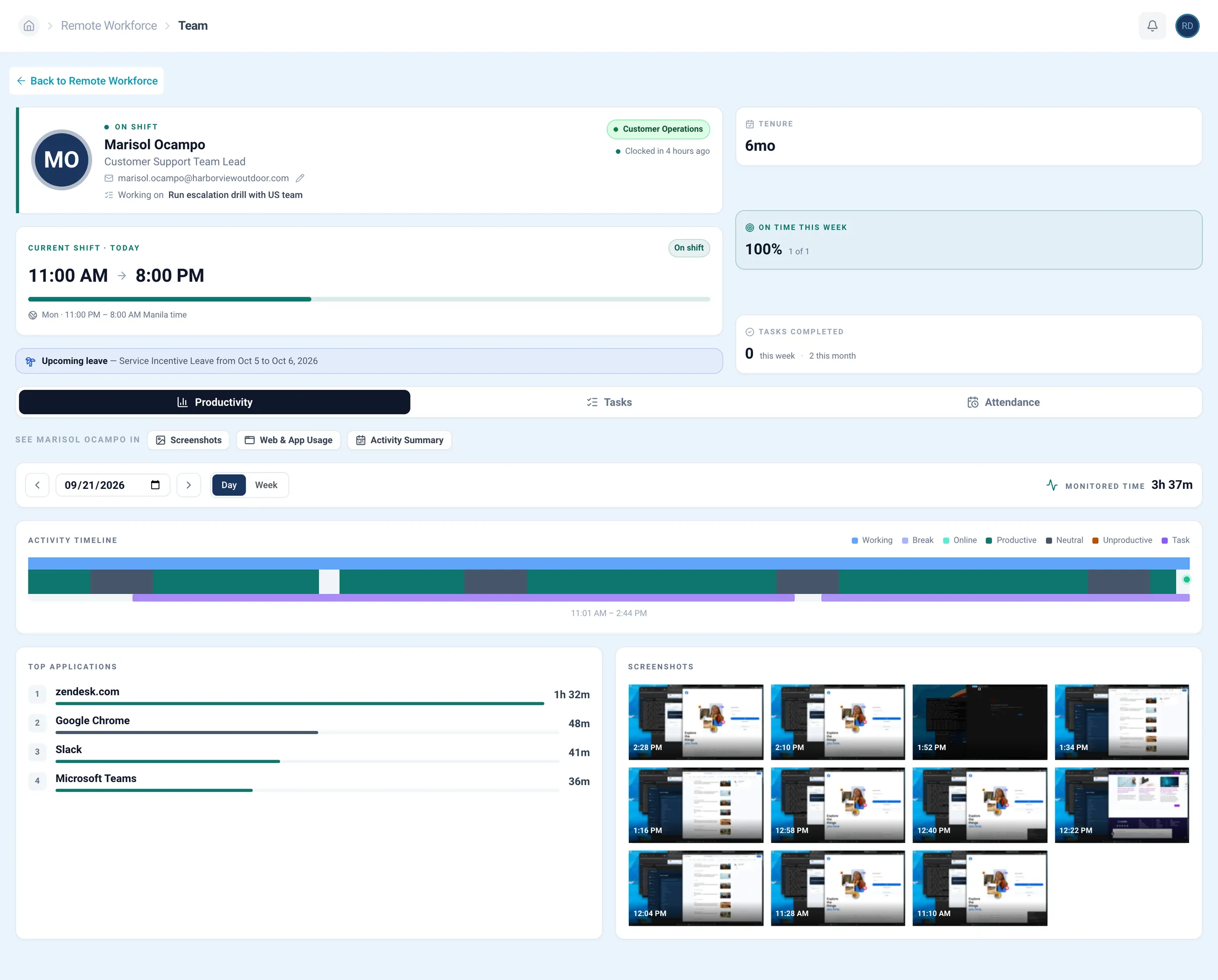
Open anyone’s page and you’ll know their shift, what they finished, and how their week is going.

  • A live roster of who’s on shift
  • Tasks completed, per person
  • Productivity and attendance side by side
  • Each manager filters the roster to their team

Team organization

See who’s on shift right now, in your hours, and what each person is working on.

Look around before you sign up.

The RE Portal’s projects, board, and team pages, as you’d open them. Underlined words move the lens, and screens expand on click.

RE PortalProjectsProjects
RE Portal: Projects

Projects and tasks are one corner of the RE Portal. Explore the rest, book a demo, or connect your AI and ask what got done today.

Ask your AI for work updates.

Connect Claude or ChatGPT to the RE Portal through our MCP server, then ask about projects, tasks, and who’s free in plain language.

  • Ask what each person finished today
  • Check which tasks are still open on a project
  • Find who’s free before you hand out work

Works from Claude ChatGPT and any MCP-capable assistant

Set up the MCP server
A demonstration of the flow, not a real transcript.

Trusted by

  • QuickSmith
  • Mobile Tinters
  • RORK
  • Independent Roller Door Services
  • Life Space
  • ALTUS
  • PerfectClicks
  • Pro Chronic Care Management
  • Therapy Kids
  • SimpleConnect
  • AccountAcumen
  • act
  • SCG
  • American Cycle Finance
  • Brown Joseph
  • Childcare Developments Group
  • Homes LA
  • HTRK
  • Insurance Services Group of the Southeast, Inc.
  • Nova Point of Sale
  • Source Points Rewards
  • subroIQ
  • PERC
  • RPG
  • Perspecta
  • DSC
  • Saeed & Little
  • Upgrade
  • Paragon
  • New Move-in Rewards
  • NIES
  • Mil-tek
  • Play HQ
  • Handa Developer Group
  • AES
  • Preda
  • Mowery & Schoenfeld
  • Consulting Well
  • The Investment Collective
  • Henx
  • Byrne & Jones
  • CPAudits
  • Old Greenwich
  • Collective
  • Cerge
  • Brown & Joseph
  • RxFree4Me
  • STI Group
  • Drost
  • Pathway
  • Bunbury Farmers Market
  • LaserBounce

Compare the tools you’re juggling.

Project tools hold the tasks, not the people. Chat scatters the work. HR systems know the people, not the work. The RE Portal keeps it all together.

Productivity

Projects, tasks, and people in one place.

Cost to useFree
  • Projects and tasksIncluded
  • Time spent on each taskIncluded
  • A board from to-do to doneIncluded
  • Who’s on shift right nowIn your hours
  • Teams organized by managerRosters by team

Project tools

Tasks, without the people.

Cost to use$5–31/mo per user
  • Projects and tasksIncluded
  • Time spent on each taskOn some plans
  • A board from to-do to doneIncluded
  • Who’s on shift right nowNot included
  • Teams organized by managerAssignees only

Chat and spreadsheets

Work spread across threads.

Cost to use$0–15/mo per user
  • Projects and tasksYou keep track
  • Time spent on each taskYou add it up
  • A board from to-do to doneNot included
  • Who’s on shift right nowYou ask
  • Teams organized by managerChannels only

HR systems

People, without the work.

Cost to use$6–25/person/mo
  • Projects and tasksNot included
  • Time spent on each taskNot included
  • A board from to-do to doneNot included
  • Who’s on shift right nowSchedules only
  • Teams organized by managerOrg chart only

Competitor costs are typical published per-user ranges as of October 2026. Productivity tools come with the RE Portal at no extra cost; hiring has a setup fee and a monthly fee.

Productivity

Hire the team. Hand out the work.

Hire through us, then plan projects and assign tasks in the same RE Portal, with an account manager who knows your team.

RecruitingEmploymentHRPayrollITRemote Employee

  • Free to use
  • Hours behind every task
  • Projects and task board
  • Works with your AI

From project managers.

How clients plan projects and hand out work in the RE Portal.

We are still in the beginning stages, but I am hopeful that our partnership will continue to grow.

ManagerEye Surgery Center

Remote Employee helped us streamline operations, save time, and focus on growing our business.

Mike DownesOwner

The support has been incredible. Fast, flexible, and always there when we need help daily.

Jamie MoricleEmployment Facilitator

The team is responsive, reliable, and helps reduce our workload so we can focus on growth.

Sanjay KapoorCOO and Partner

Remote Employee improved our efficiency and helped us build a stronger, scalable organization.

Misty WalterBusiness Operations Manager
Next step

Still chasing status updates? Try the portal free.

Start in the portal, walk through it with our team, or talk to a recruiter about the people you need first.

Open the portal

Enter your work email and explore projects, the task board, and your team view. Free, no call.

Access the RE Portal free

Get a walkthrough

10 minutes with our team, to go over how your work actually runs.

Book a demo

Need people to do the work?

Tell a recruiter what’s piling up on the board, and we’ll scope the roles, cost, and start dates.

Talk to a recruiter

Common questions about our team productivity tools.

What it shows, what it costs, and how it fits with the rest of the RE Portal.

Plan projects, hand out tasks, and check what each person finished, with the hours behind every task.

It’s all in the RE Portal, so you know what got done without asking for a status update.

Yes. The RE Portal is free to use, from planning projects to checking your team’s day.

Hiring through Remote Employee® has a setup fee and a monthly fee, and every hire comes with portal access.

Yes. Create a task, give it an owner, and move it across the board as the work gets done. Everyone knows what’s theirs.

Yes. Every project shows the time spent this week and in total, next to its members and tasks.

Yes. The team roster shows who’s on shift, in your hours, and what each person is working on.

Yes. Each employee has their own page with their shift, tenure, tasks completed, productivity, and attendance.

Yes. Each manager can filter the roster and projects to their own team, so their view shows the people and work they run.

No. Projects, tasks, and your team view are built into the RE Portal, the same login you use to hire and track hours. Nothing to install or sync.

Yes. Connect your assistant through our MCP server, then ask what got done today, which tasks are still open, or who’s free to pick up more.

Enter your work email to open the RE Portal free, or book a demo. Once you hire, your team shows up on your board automatically.

No sales call needed

Unlock the talent marketplace.

Browse screened candidates for every department and post your open roles. It’s all free to use.

Talk to a recruiter

Tell us about the role you need, then pick a time to talk it through with a recruiter.

We use your details only to reply about your hiring. Privacy policy

Connect your AI assistant

Tell us where to send it, and we’ll email you the setup instructions and your access to the RE Portal MCP server.

We use your details only to send your access and reply about your hiring. Privacy policy