
Allowing your team to work from home can boost productivity, reduce costs, and make life easier for everyone. But only if trust stays intact. When that trust breaks down, it doesn’t just slow things down; it puts your entire operation at risk. But how can you keep your employees from taking advantage of working from home?
“37% of remote employees have two full-time jobs. It’s a lot harder to spot underperformance when someone’s behind a screen instead of down the hall. Missed deadlines, vanishing acts, and side gigs during work hours can go unnoticed longer and do more damage.”
 Ruffy GalangCEO of Remote Employee®
In this blog post, we break down how to spot the warning signs, set clear guardrails, and keep remote employees accountable without micromanaging them.
How Do You Know When Your Employees Are Taking Advantage of Working From Home?
One sign? When the output doesn’t match the hours.
Remote setups make it harder to spot when someone’s phoning it in. You can’t swing by their desk. You can’t see how often they’re stepping away. And you don’t want to babysit with constant check-ins or tracking software that wrecks morale.
So, how do you know when performance is slipping?
Watch for clear patterns:
- Deliverables keep slipping through the cracks
- Work feels rushed or sloppy
- Replies get slower or disappear entirely
- They vanish from meetings or show up late, often
If these issues keep stacking up, you’re looking at a bigger problem. Before we get to how to fix it, let’s talk about setting things up so it doesn’t happen in the first place.
Further Signs Your Employees Are Taking Advantage of a Remote Arrangement
It’s one thing to miss a ping. It’s another to go dark for hours. If someone’s taking remote work as a license to coast, the warning signs stack up fast:
- Skipping calls or always “having tech issues”
- Dropping the ball with clients
- Ducking out mid-shift without notice
- Missing Zoom calls because of a “bad Internet connection”
These are signals that accountability is slipping.
Find Employees Who Are Always Accountable
Take back control with offshore staff you select, manage, and trust, while we handle payroll, compliance, and a professional office space.
How to Keep Employees From Taking Advantage of Flexibility
Keep your team locked in, motivated, and performing at a high level, without micromanaging. Here’s how to make that happen.
1. Schedule Check-Ins
60% of managers are concerned that employees who work from home are less productive. Don’t let check-ins slide. Use your regular meetings to ask pointed questions: what’s on their plate, what’s blocking progress, and how they’re feeling. Consistency keeps people engaged and accountable.
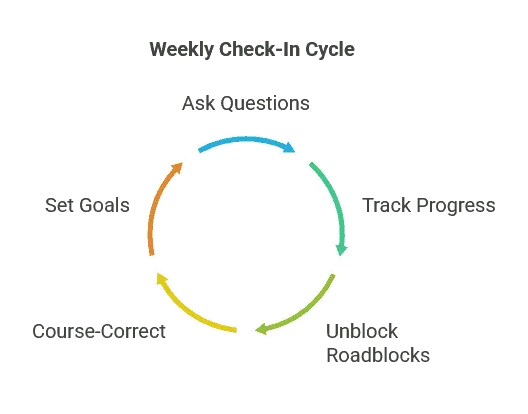
Your weekly check-ins should be brief, focused, and centred on execution. It’s your chance to track progress, unblock roadblocks, and keep projects moving forward.
Ask direct questions:
- What’s done?
- What’s stuck?
- What’s next?
Then, course-correct as needed. If something’s off, call it early. If they crushed it, say so. Set the tone for the week ahead with clear goals and next steps.
Save the big-picture career talks for your quarterly one-on-ones. Check-ins are your play-by-play.
2. Track What Matters
For roles where output is harder to measure, tracking tools can help. Whether it’s time logs or project-based tools, use them when needed, but sparingly. Jot down wins, mistakes, and moments that stand out. When it’s time for formal reviews, you’ve got real data.
If your review process changes by team or manager, it’s neither fair nor helpful. Use the same forms, the same scoring system, and the same criteria. This keeps feedback consistent and allows you to spot patterns across your organization, not just within a department.
Bring in 360° feedback from coworkers, cross-functional partners, and direct reports. It gives you a fuller view of how someone actually works, not just what you catch in meetings., deadlines, and handoffs. Utilize visual project platforms that facilitate easy and transparent participation for everyone.
| Learn more about how you can find and hire reliable employees: Here’s How to Hire Employees in the Philippines What is a Contingent Worker? How Your Business Can Get Help With Specific Tasks What You Need to Do to Overcome Common Staffing Challenges in a Competitive Market |
3. Recognize Wins
Shout out, great work. Whether it’s a quick Slack post or a team-wide mention, show people you notice. When good work gets recognition, the rest of the team steps it up.
When recognizing employees, explaining what the recognition is for helps employees relate the recognition to their behavior. This encourages continued strong performance.
The longer it takes for managers to recognize employees, the less likely employees are to see the affirmations as authentic. Make employee recognition a priority and have formal recognition systems in place so you can strike while the iron is hot.
4. Set the Ground Rules
Leave no room for gray areas. Spell out precisely what’s expected during the workweek: availability, hours, communication, approved locations, and what crosses the line. Get it in writing.
Break down policies, workflows, and responsibilities in plain language. During onboarding, walk them through the systems, the steps, and who to go to when things go sideways. Don’t just hand them a handbook; show them how it all works in real time.
Once they’re up and running, keep reinforcing the goalposts. Use check-ins to tie their work to clear targets and measurable outcomes. If numbers are unclear, provide them with a roadmap. Talk through how to approach the challenge, which tools to lean on, and how others have handled it successfully.
5. Build Ownership Into the Culture
Make accountability part of the daily rhythm. Give your team targets that matter, room to grow, and shout-outs when they hit the mark. When people see their results tied to real goals, they step up because now they own the outcome.
From day one, ensure your team has what they need to feel comfortable. That means clear training, solid tools, and time to get up to speed. Then, maintain that momentum with genuine learning opportunities. Online courses. Peer shadowing. Hands-on projects. Give them chances to grow and show them what’s next on their career path.
Want your team to step up? Ask what they think. Make it a habit to bring them into decisions, not just tasks. When they offer suggestions, don’t brush them off. Ask questions. Take notes. Show them their input has weight, even if you can’t act on it today.
But even with the right culture in place, some teams still struggle to stay on track, especially when they’re remote. If accountability continues to slip through the cracks, it may be time to reconsider how your team is structured.
The Fix? Remote to You. In-Office to Us.
80% of remote employees report being on their phone during work hours. The way you stop work-from-home abuse is simple. Hire remote employees who still report to a physical office.
They’re remote to your location but fully accountable on-site with us. Productivity is tracked. Attendance is monitored. You get the flexibility of remote hiring without the headaches of people working unsupervised from their couch.
We handle everything else: payroll, benefits, compliance, workspace, and even secure communications.